









Business Security Camera Systems for Closing Time Handoffs After Hours
Business security camera systems serve more than just recording incidents that have already occurred. For stores, offices, salons, clinics, and small warehouses, these cameras help with the closing procedures: ensuring that the cash register area is clear, checking the back door, reviewing the inventory, sending out alerts, and documenting who was responsible for various tasks before shutting down for the night.
Why closing time is the real buying pain
Most small businesses start shopping for cameras after something stops feeling manageable: a late text about the back door, a messy register area found the next morning, or a window alert that no one can quickly verify. The purchase driver is rarely just theft prevention; it is accountability when nobody is on site. A closing camera routine gives the team a shared set of views to confirm before leaving and gives a remote owner a calmer way to respond after hours.
Closing routine by role and what to check
A closing handoff works when each person knows what they own. If everyone is responsible for checking cameras, no one truly owns the last review.
Store manager or site lead
The manager defines the checklist and keeps it short enough to use consistently. A clear directive looks like: “Review register, back door, stockroom, and front window before arming the alarm.” A vague instruction like “check cameras” tends to get skipped. Permissions for viewing feeds, exporting clips, and managing footage should reflect each person’s role.
Closing employee
The last person on site follows the same routine every night:
- Review the required camera views before leaving.
- Note anything unusual in the closing log.
- Lock doors, turn off lights according to the plan, and arm the alarm if used.
- Send the handoff message to the manager or remote owner.
The four views that matter most before leaving:
- Register area: Confirm the POS area is clear, cash handling is finished, drawers are secured, and no customer or vendor is lingering near the counter.
- Back door: Confirm the door is closed, the path is clear, and no package, tool, or equipment has been left in a risky spot overnight.
- Stockroom: Check that high-value goods, supply shelves, and exits look normal before the building is empty.
- Front window: Review glass, signage, displays, and street-facing activity. This view also catches night reflections from interior lighting that can make the window appear active when nothing is happening.
These checks take a few minutes. Camera review supports the physical close; it does not replace locking doors, securing cash, or walking the space.
Remote owner or after-hours contact
The remote contact responds to exceptions, not routine pings: a person near the back door after closing, motion in the stockroom, activity near the front window, or a camera going offline before everyone has left. A manager might take routine after-hours alerts, while a security contact handles alarm-related or high-risk notifications.
After-hours alerts and handoff rules
A closing handoff message should answer three questions: who was last on site, what looked normal, and who owns alerts from that point on. Keep it short and repeatable:
- “Closed at 9:07 p.m.”
- “Register, stockroom, back door, and front window reviewed.”
- “No exceptions” or one clear note, such as “Delivery left by rear shelf for morning pickup.”
- “Alerts handed to Maya until open.”
Alert severity should also be defined in advance. A person walking past the front window may only need event storage. Motion in the stockroom after arming may need a manager call. A camera going offline at the back door may need a check before everyone has left.
Footage retention, access, and privacy
Footage retention should match your business risk, storage capacity, and local compliance requirements. Routine footage can follow an overwrite schedule, while incident clips or clips connected to a report should be saved and labeled separately before the overwrite window closes.
Access works best as role-based permissions. A shift lead may need live view for closing. A manager may need event review and clip export. An owner or admin may control device settings, storage, and user permissions. Avoid shared logins. When a question comes up later, shared access makes it impossible to know who acted.
Also define where cameras do not belong. Restrooms, changing areas, lactation rooms, and other spaces where workers expect privacy should stay off the monitoring plan.
Night image checks before you trust the system
A closing checklist can still fail if the night image is poor. Test actual conditions after the lights go off, not just daytime live view.
Start with glass reflection. A camera facing a front window often picks up interior lighting reflected into the lens after dark, turning usable footage into glare. Adjusting the angle, dimming the source light, or shifting to an exterior-facing view usually resolves it.
Then test the real light-off sequence. A rear entrance may look clear at dusk and completely dark at midnight. Check whether existing lighting, or the camera’s own illumination mode, gives enough detail for the remote contact to identify what is happening.
Where eufy fits a closing-time workflow
Start with the workflow, then match equipment to it. For shops, offices, restaurants, and warehouses, you can compare options at eufy business security cameras before settling on a setup.
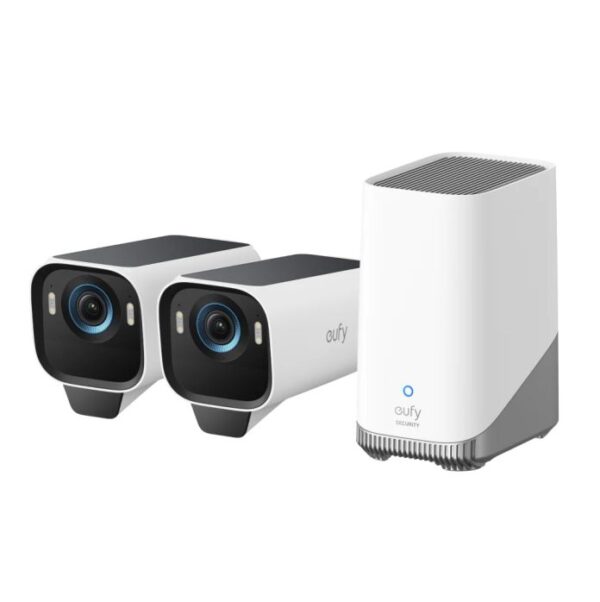
For exterior after-hours views around doors, yards, rear entrances, and approach paths, the eufyCam S3 Pro 2-Cam Kit is built for outdoor placement without a dedicated power run. It records in 4K with MaxColor Vision™ for full-color footage after dark. Dual motion detection with radar and PIR is rated to reduce false alerts by 99%, which cuts down on unnecessary late-night notifications. HomeBase™ S380 stores footage locally, with 16 GB built in and expandable storage up to 16 TB, and no monthly subscription.
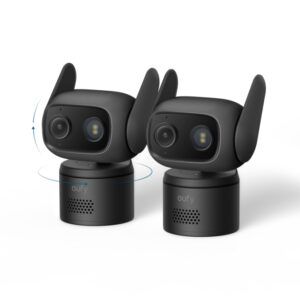
For indoor views that need continuous recording, such as register areas, stockrooms, or sheltered entry points, the eufy Wired Cam C31 2-Pack runs on wired power and records 24/7. Its 360-degree pan-tilt and PureColor Vision™ full-color night vision let a manager review a full room from one view rather than a fixed angle. Recording requires a microSD card (32–256 GB, sold separately) or a compatible HomeBase. It is IP66-rated for water and dust resistance.
If your priority is outdoor coverage around doors, entrances, and perimeters, the eufyCam S3 Pro 2-Cam Kit is the right fit. For 24/7 continuous recording in indoor spaces like register areas or stockrooms, the eufy Wired Cam C31 2-Pack is better suited.
Conclusion
Cameras earn their place when the team knows what to check, who handles alerts, and where footage goes. Keep the checklist short, protect employee privacy, test the night image, and match equipment to the views and storage your workflow depends on.






