





AlignOps ToolWatch has rebuilt its Universal Maps functionality, bringing asset location data together in one clear searchable view. Users can see everything they own including tools, equipment and materials, wherever it sits, thus eliminating hours of searching. New filtering more intuitive and easy to use with new capabilities include GPS gateway visibility – showing battery powered GPD gateways directly on the map with their own icon. A new search bar allows users to jump straight to a specific location by name; while filters are now organized into clear categories including Pins (Bluetooth scan, GPS Gateway, or bar code scan), Categories, Models, Last Scan Range, and Assignment. Selected filters show up as removable icons, so users can clear one filter at a time, or hit Clear All to start over.
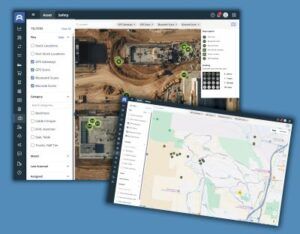
Image Courtesy of: AlignOps ToolWatch
Each filter drop down has its own search box, allowing users to narrow down a long list of models or categories while typing instead of scrolling. In addition to these new features and functionalities, the program maintains its features such as Map Legend and Icons – with a built-in legend an d clear icons it is instantly obvious whether an item was last seen by GPS, Bluetooth (BLE), or barcode scan. Every item shows how it was last scanned so that users know how current and precise that location is. Icons are shaded based on how long it has been since the last scan – 0 to 24 hours, 1 to 7 days, 7 to 30 days, or 30+ days; fresher scans stand out at a glance. Clicking on any item opens its detail page immediately, showing site assignment, responsible party, and return date.
Battery powered GPS gateways report their own real-time location, so items scanning through them show up exactly where they are, proving the most precise option on the map. Plug-n gateways do not carry their own GP, so items they scan show up at the plugged-in gateway’s assigned location (address and lat/log), stacked with everything else at that location. That location still shows up on the map and still updates, but it Is not pinpoint precise the way battery powered units are.
Whether users are managing assets from the warehouse or tracking them across the field, Universal Map turns location data into information that the team can act on. ToolWatch Universal Map is available to every ToolWatch customer, stock, non-stock, and barcode scan locations included. Wireless Tracking can be added to unlock GPS and Bluetooth visibility, including embedded tags in Milwaukee and DEWALT tools.
For more information about ToolWatch Universal Map, visit alignops.com/toolwatch.
About AlignOps ToolWatch
AlignOps ToolWatch is an industry-leading asset management software solution that gives organizations visibility and control over tools, equipment, materials, and other critical assets. Designed to support contractors and operations teams, ToolWatch helps improve accountability, streamline workflows, and increase operational efficiency across the office, warehouse, and field.
For additional information, visit alignops.com/toolwatch, email info@toolwatch.com, or call (800) 676-4034.






